
ibelsa
Your assistant recognises your guests, checks free rooms and prices, takes bookings and passes requests on to your front desk.
Once ibelsa is connected, your assistant knows your rooms, rates and free dates like a colleague at the front desk with the Room Rack open. It recognises your guests by their phone number, tells callers which rooms are free and what they cost, and finds their bookings.
And when you allow it, your assistant also books rooms as options, passes guest requests on to your front desk and cancels bookings it made by phone.
Early access
ibelsa isn't switched on for every account yet. If you don't see it under Integrations, write to support@fonio.ai and we'll enable it for you.
Get your key from ibelsa
Sign in to ibelsa and open Settings → Integrations. Type API into the search box and click ibelsaAPI.
Click Create new API Key. ibelsa charges a one-time fee for every new key (300 € when we wrote this), and keys aren't available on its free plan. Confirm with Create for a fee.
Under Name, choose Other at the end of the list. Enter fonio.ai under Name of third party system and click Create for a fee.
ibelsa shows the new key only once. Click Copy to clipboard, keep the key at hand for the next step and click Done.
Then tick Write access for the new key and click Save changes.
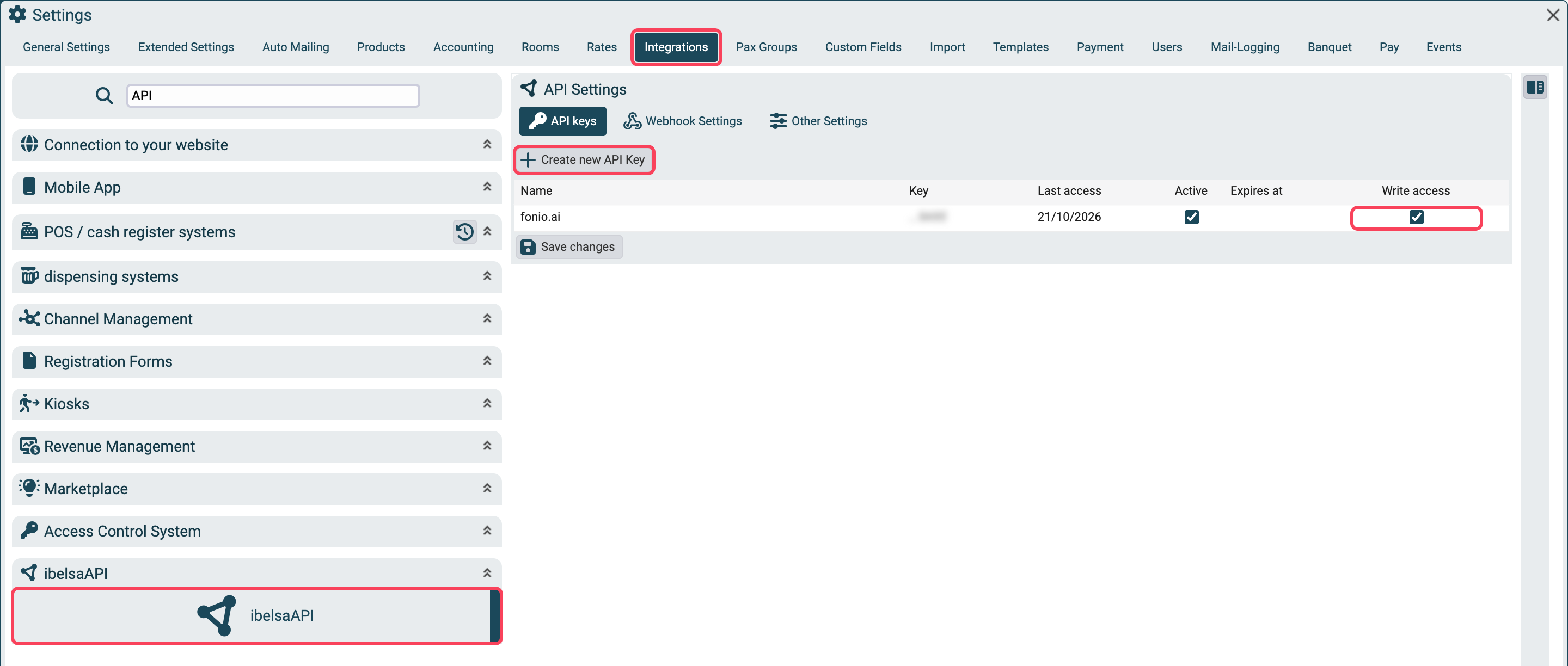
Your assistant works with this key. It reads your rooms, rates and bookings, and only changes something in ibelsa when you allow it in step 3.
A key just for fonio keeps your own login out of it, and you can switch it off at any time.
If you don't see ibelsaAPI, your user needs the right Creation of API keys and usage of API. Whoever manages ibelsa at your hotel can give it to your group under Settings → Users.
Connect ibelsa to fonio
In your assistant, open Integrations, add ibelsa and fill in the details under ibelsa API.
-
API key
The key from the first step. It looks like this:
7F3A9C21-4B8E-4D2A-9E61-0C5B7D3F8A12_5E2D8B4C-1A7F-4C9E-B3D6-8F0A2E6C4B91When you save, we check right away whether ibelsa accepts it.
Choose what your assistant may do
At first, your assistant only reads from ibelsa: it checks free rooms and prices and finds bookings. Everything that changes something in ibelsa stays off until you switch it on. You can change all of this at any time.
-
Name
A short name for this connection. The default is ibelsa.
-
Rates
The rates your assistant offers and books. Leave it empty and it offers all your rates without a promo code. Extras like parking spaces or meeting rooms are never offered.
-
Book rooms
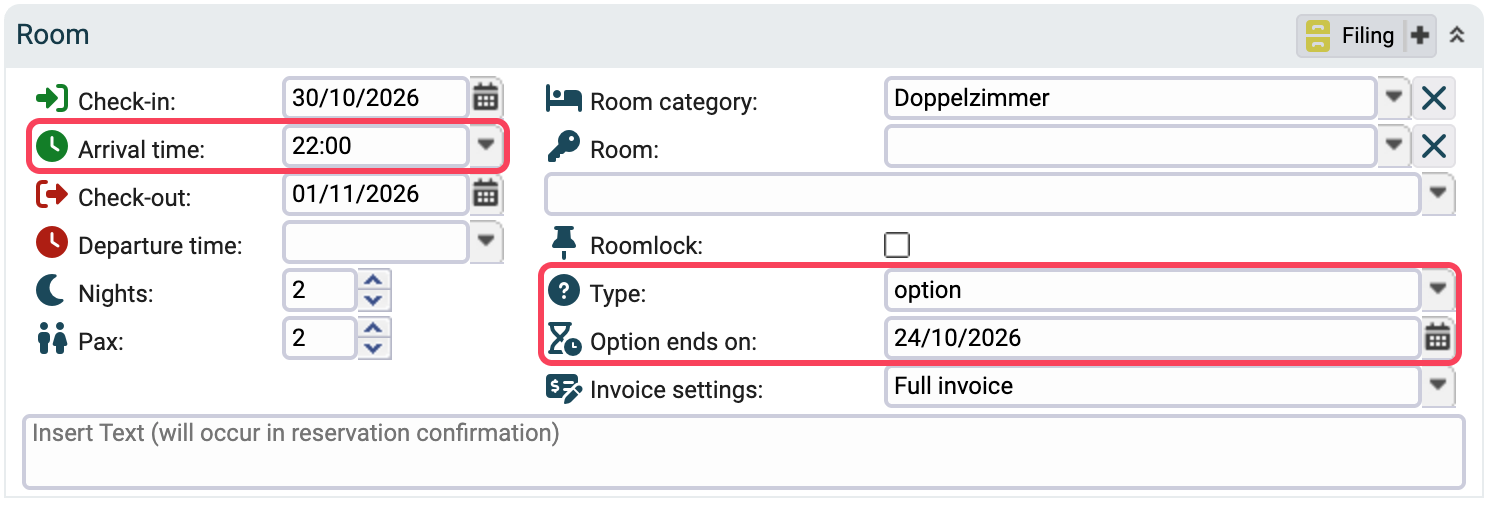
Off by default. Your assistant books rooms as options for 3 days, or until the arrival day if that comes sooner. You then confirm the booking in ibelsa as usual. Switched off, your assistant still checks free rooms and prices, and tells callers plainly that it can't book.
-
Cancel bookings
Off by default. Your assistant cancels bookings it made by phone, up to the deadline below. Bookings from booking platforms or made at your hotel are never cancelled by phone.
-
Cancellation deadline in days
Shows up once Cancel bookings is on. How many days before arrival callers can still cancel. The default is 1, so up to the day before arrival.
-
Pass on guest requests
Off by default. Your assistant saves requests like a late arrival, a baby cot or an allergy as a note on the booking for your front desk.
-
Log calls
Off by default. After each call, a short summary is saved on the caller's bookings.
Whatever is switched off, your assistant tells callers plainly that it can't do that.
Before the call
When the phone rings, your assistant loads your room types and rates from ibelsa: how many guests fit in each room type, what a rate includes and its cancellation terms.
It also looks for the caller's number in your ibelsa contacts. If the number is saved on a guest profile, as a mobile, private or business number, your assistant knows who's calling. It has their current and upcoming bookings in front of it: dates, room type, rate and status.
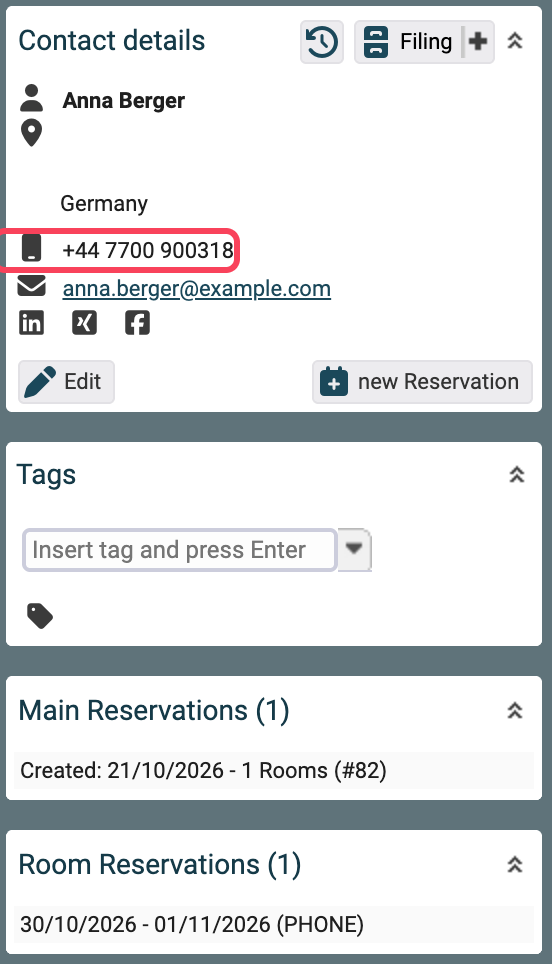
So when Anna calls to ask whether everything is ready for her stay, your assistant can answer straight away, without asking for a booking number.
If ibelsa can't be reached when the phone rings, your assistant doesn't guess. It tells callers plainly that it can't help with rooms or bookings right now.
Stays between you and your assistant
Your assistant never reads out internal ibelsa numbers, only your booking numbers. It only talks about a booking when it recognises the caller by their phone number, or when the caller gives the booking number together with the guest's last name.
During the call
When a caller asks for a room, your assistant asks for arrival, departure and how many guests are coming, children included. It only offers room types that are free for the whole stay and fit everyone, with your rates and the price for the whole stay as ibelsa calculates it. If a rate has city tax on top, your assistant says so.
For a group, your assistant checks and books each room on its own.
When you allow it, your assistant books the room. It asks for the guest's first name, last name and e-mail address, and spells each one back letter by letter until the caller confirms it. Then it repeats room type, rate, dates and guests once more. Only after a clear yes does it book. The caller hears the booking number, the price and until when the room is held.
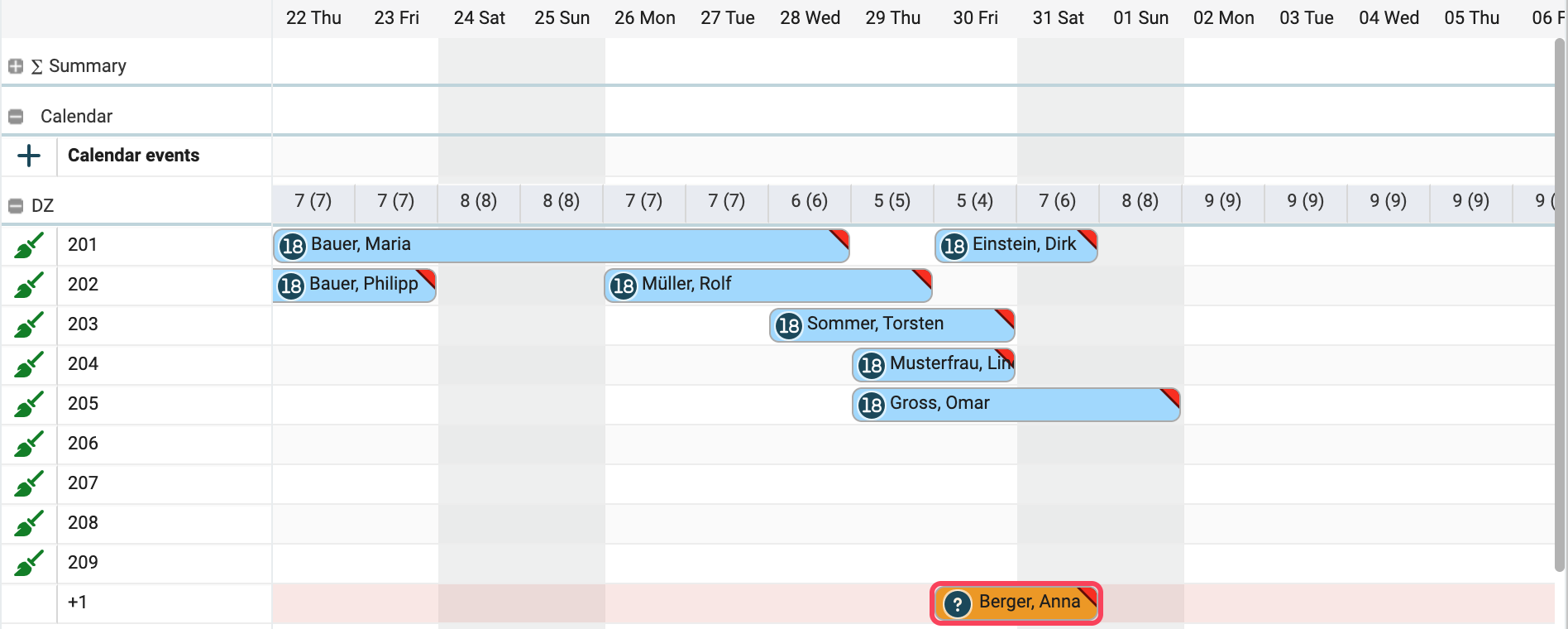
The booking shows up in your Room Rack as an option, in the row of its room type without a room yet. Its booking source is PHONE, and the arrival time the caller mentioned is saved too. You assign a room and confirm the booking as usual.
Whether the guest also gets a confirmation e-mail depends on your e-mail settings in ibelsa, so your assistant doesn't promise one.
Guests your assistant doesn't recognise give their booking number and the last name on the booking. The reference from Booking.com or another booking platform works too. Your assistant then tells them their dates, room type, rate and status.
When you allow it, your assistant passes guest requests on to your front desk, like a late arrival, a baby cot or an allergy. It repeats the request first, saves it as a note on the booking and never promises that it will be fulfilled. You find the note in the room's Filing, and it also appears on your cockpit report.

So when Anna calls back to say she'll only arrive around 10 pm, your assistant finds her booking, repeats her request and passes it on. Your front desk knows before she's there.
When you allow it, your assistant also cancels bookings it made by phone, as long as the guest hasn't arrived and your deadline hasn't passed. It first tells the caller that the whole booking with all its rooms is cancelled and that this can't be undone, and asks them to confirm. Bookings from booking platforms or made at your hotel can't be cancelled by phone, and your assistant tells the caller so.
Whenever your assistant can't do something, it tells the caller plainly.
After the call
With Log calls switched on, your assistant writes a short note in ibelsa: the date and time, a summary of the conversation and a link to the call, plus the recording if there is one.
The note goes into the Filing of every booking your assistant recognised, found or made in the call. It's added as a new entry, so nothing you wrote gets overwritten. Bookings cancelled in the call get no note.

Calls without a booking, like a quick question about prices, aren't logged. In your Call History, under Post-Call Actions, you can see whether the note was saved.
Good to know
- Options, not firm bookings: every booking by phone is held as an option for at most 3 days, never past the arrival day. You confirm it in ibelsa as usual, or release the room.
- Phone numbers: your assistant recognises guests by the mobile, private or business number on their guest profile. How it's written doesn't matter, with or without country code.
- Withheld numbers: without the caller's number, your assistant can't recognise them. They can still give their booking number and last name, and book with an e-mail address.
- New guests: when your assistant books for someone new, ibelsa saves them with their name, e-mail address and phone number. Next time, your assistant recognises them.
- Limits: your assistant offers up to 10 rooms and rates at a time, cheapest first. If more are free, it asks which room type the caller would like. Stays can be up to 30 nights, and your assistant finds bookings up to a year ahead.
- Prices and rules: your assistant only offers a rate when it has a price for every night of the stay, and it follows your minimum stay and arrival rules from ibelsa.
- Time zone: what counts as "today", the option dates and the cancellation deadline follow Central European time.
- Your key: your assistant only works with the key you created. If you stop using the integration, untick Active for that key or delete it under Settings → Integrations → ibelsaAPI.
If something isn't working
| Message | What to check |
|---|---|
| ibelsa rejected this API key. Check that it is active. | Did you copy the whole key? Is Active ticked for the key under Settings → Integrations → ibelsaAPI? |
| ibelsa could not be reached. Try again later. | Does ibelsa open in your browser? If it only happens now and then, ibelsa was briefly unreachable. |
| The hotel data could not be loaded from ibelsa (under Pre-Call Actions in your call history) | Is the key still active? If it only happens now and then, ibelsa was briefly unreachable. |
| The call summary could not be saved in ibelsa (under Post-Call Actions in your call history) | Is Write access ticked for the key? If it only happens now and then, ibelsa was briefly unreachable. |
| Your assistant doesn't recognise a regular guest | Is the caller's number saved on their guest profile, as a mobile, private or business number? Did they call with a withheld number? |
| Your assistant doesn't find a booking | Did the caller give the last name exactly as it's spelled on the booking, like Müller and not Mueller? Is the stay still ahead or going on right now? |
| Your assistant offers no free room | Does the rate have a price for every night? Do minimum stay or arrival rules apply? Does the room type fit all guests? If you chose Rates, is the rate among them? |
| Your assistant doesn't book | Is Book rooms switched on? Is Write access ticked for the key? |
| Your assistant doesn't cancel a booking | Did your assistant make it by phone? Has the guest not arrived yet? Is arrival at least as many days away as set in Cancellation deadline in days? Is Cancel bookings switched on? |
Need help?
Just write us at support@fonio.ai, we're happy to help.