
HERO
Your assistant recognises your customers, tells them how their projects stand and passes their news on to your team in HERO.
Once HERO is connected, your assistant knows your customers and their projects like a colleague in the office who has every job in front of them. It recognises callers, tells them the status of their project and when your team is coming next.
And when you allow it, your assistant also writes what callers report into the project logbook, takes new inquiries as projects and logs every call in HERO.
Get your key from HERO
HERO doesn't let you create the key yourself. Write to HERO support at support@hero-software.de and ask for an API key for your company account.
Keep the key at hand for the next step. Your assistant works with it: it reads your customers, projects and appointments, and only writes something into HERO when you allow it in step 3.
Connect HERO to fonio
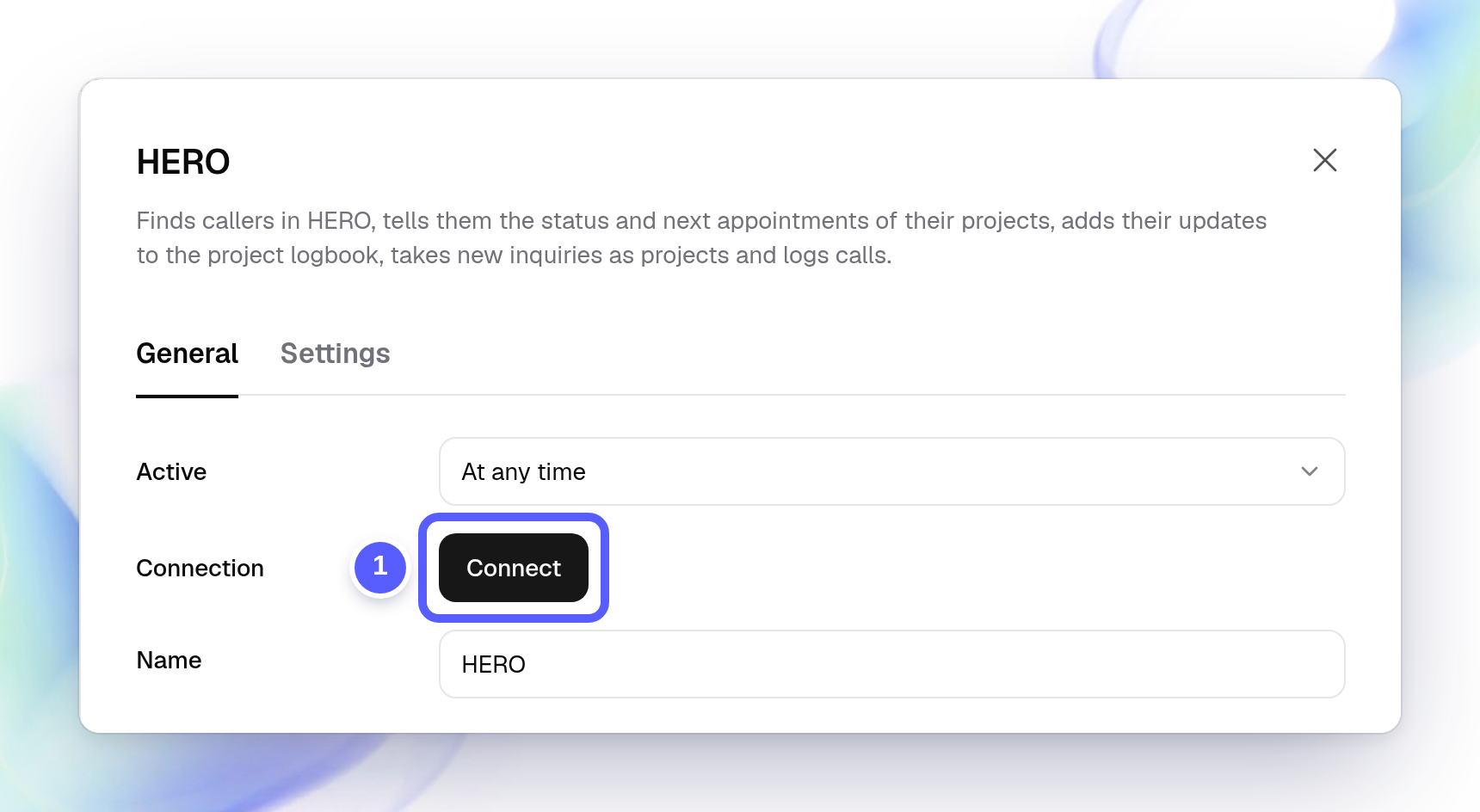
In your assistant, open Integrations and add HERO. Next to Connection, click Connect.
-
Name
A short name for this connection, so you can tell it apart later. For example
HERO. -
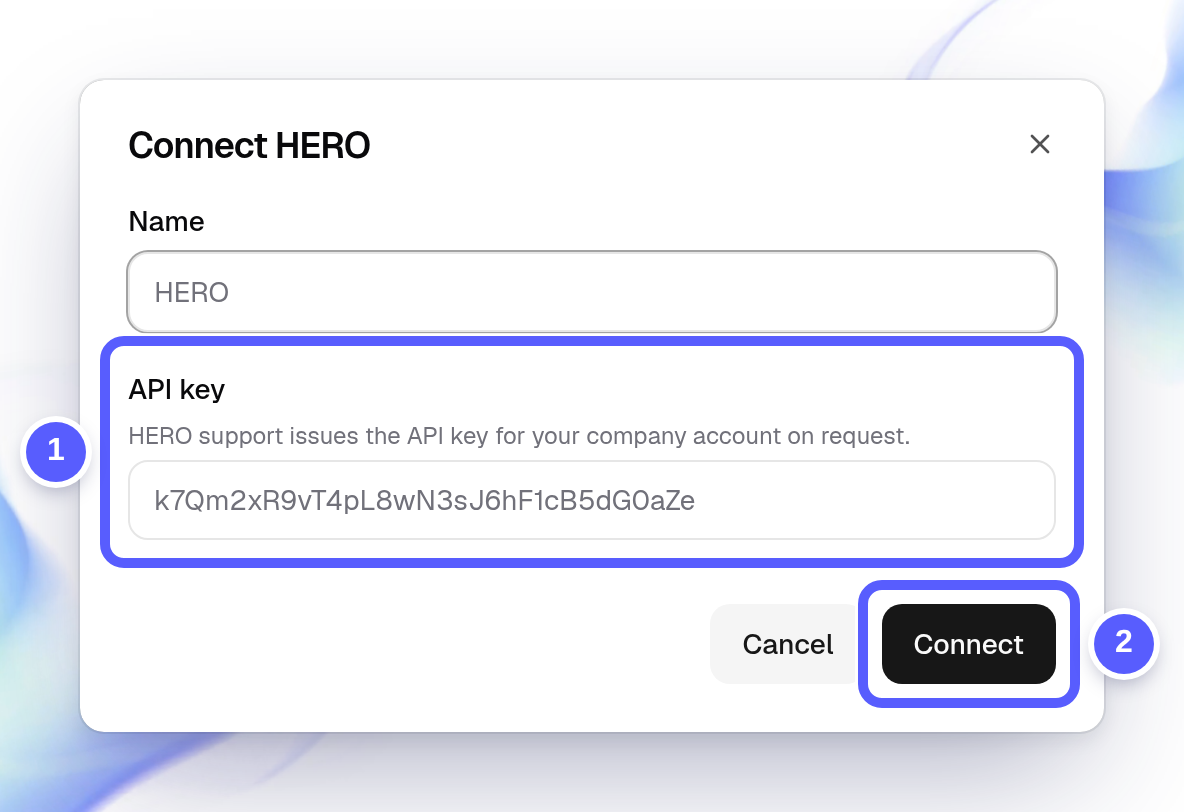
API key
The key from HERO support. It looks something like this:
k7Qm2xR9vT4pL8wN3sJ6hF1cB5dG0aZe
Click Connect. We check right away whether HERO accepts the key.
Choose what your assistant may do
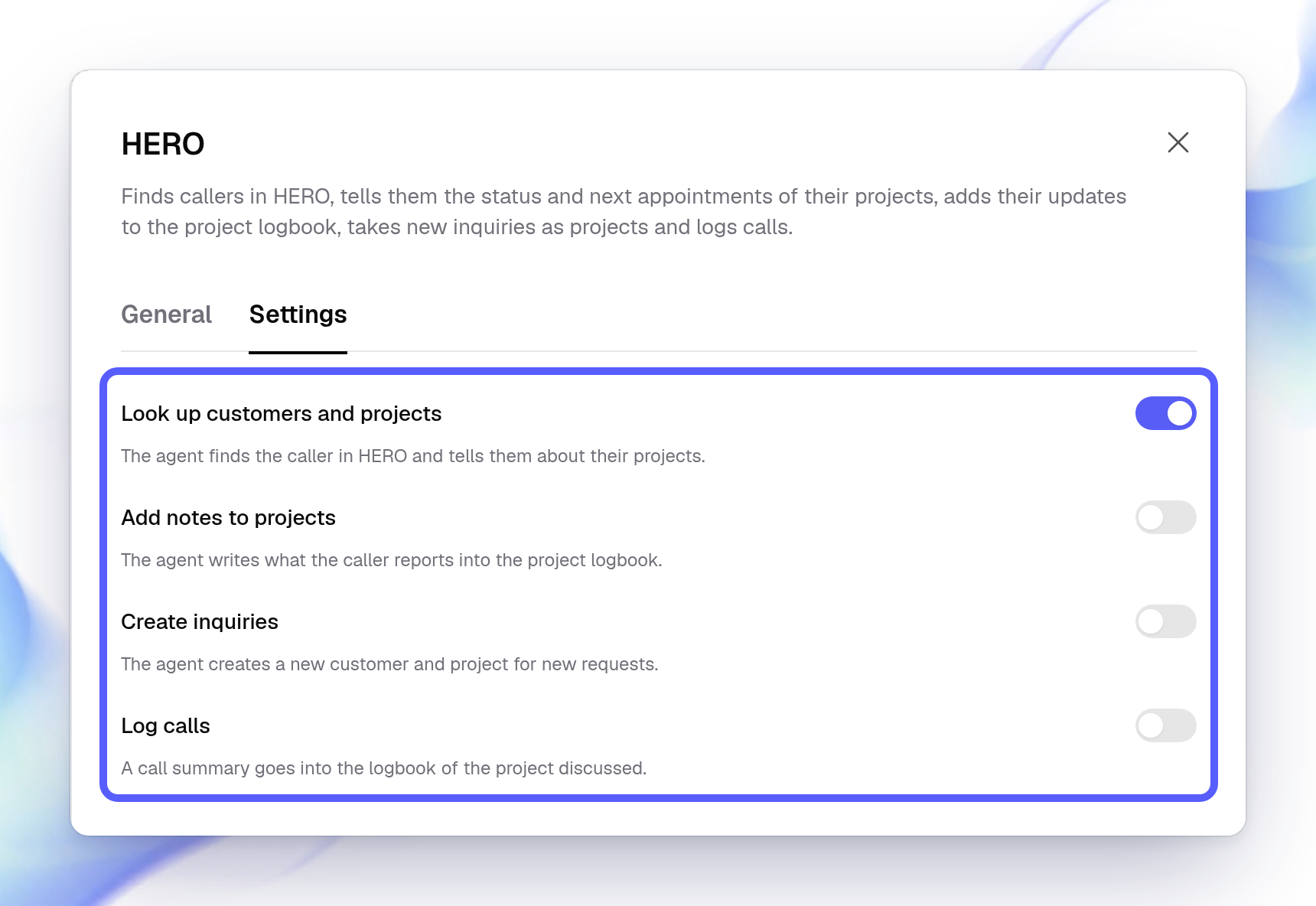
Open the Settings tab. At first, your assistant only reads from HERO. Everything that writes into HERO stays off until you switch it on. You can change all of this at any time. Then click Save.
-
Look up customers and projects
On by default. Your assistant finds the caller in HERO and tells them the status, trade and next appointments of their projects. Switched off, it tells callers plainly that it can't give project information.
-
Add notes to projects
Off by default. Your assistant writes what a caller reports about one of their projects into its logbook, like a changed date or a question for your team.
-
Create inquiries
Off by default. For new requests, your assistant creates a new customer and a project in HERO, so nothing gets lost.
-
Log calls
Off by default. After the call, a short summary goes into the logbook of the project you talked about.
Whatever is switched off, your assistant tells callers plainly that it can't do that.
Before the call
When the phone rings, your assistant checks whether it knows the caller. If you've saved them in your fonio Contacts with their last name, it looks for that name in HERO. When the caller's number is also saved on that customer in HERO, as a mobile or landline number, your assistant knows who's calling.
It then has the customer and their projects in front of it: project number, title, trade and status, open projects first.
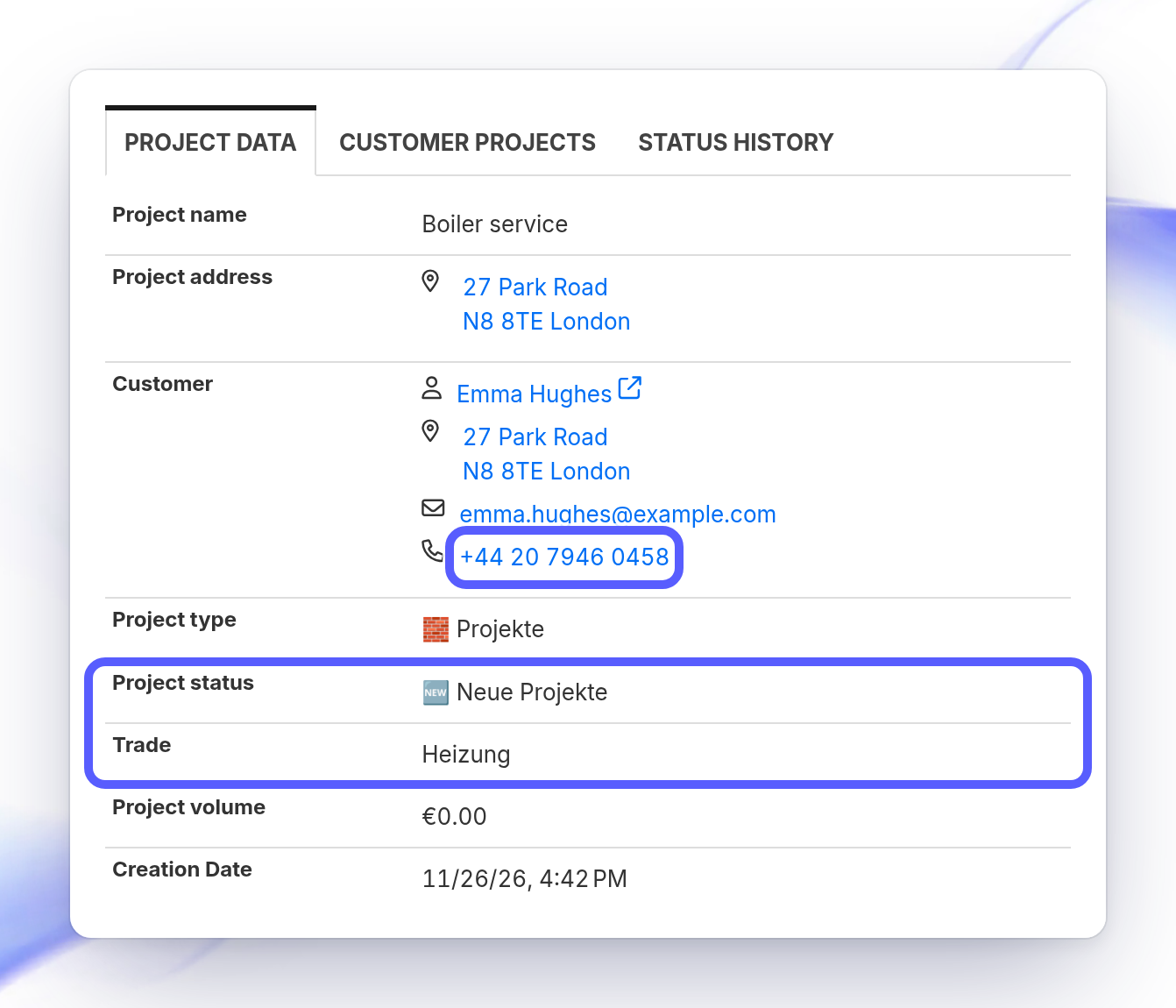
So when Emma calls to ask about her boiler service, your assistant confirms her name and can tell her straight away where things stand, without asking for a project number.
Stays between you and your assistant
Your assistant never reads out HERO's internal references. It only talks about projects once it knows who's calling: recognised by their phone number, or found by their last name together with their phone number or postal code. When it recognises a caller by their number, it confirms their name first.
During the call
When your assistant doesn't recognise a caller, it asks for their last name, or their company name. If the number they're calling from isn't saved on that customer in HERO, it also asks for the postal code of their address. Only when both match does it talk about their projects.
Asked about a project, your assistant tells the caller its status, trade and location, and the next appointments your team has planned for it.
When you allow it, your assistant writes what the caller reports into the project's logbook, in a few clear sentences. You'll recognise these entries by the fonio: at the start.
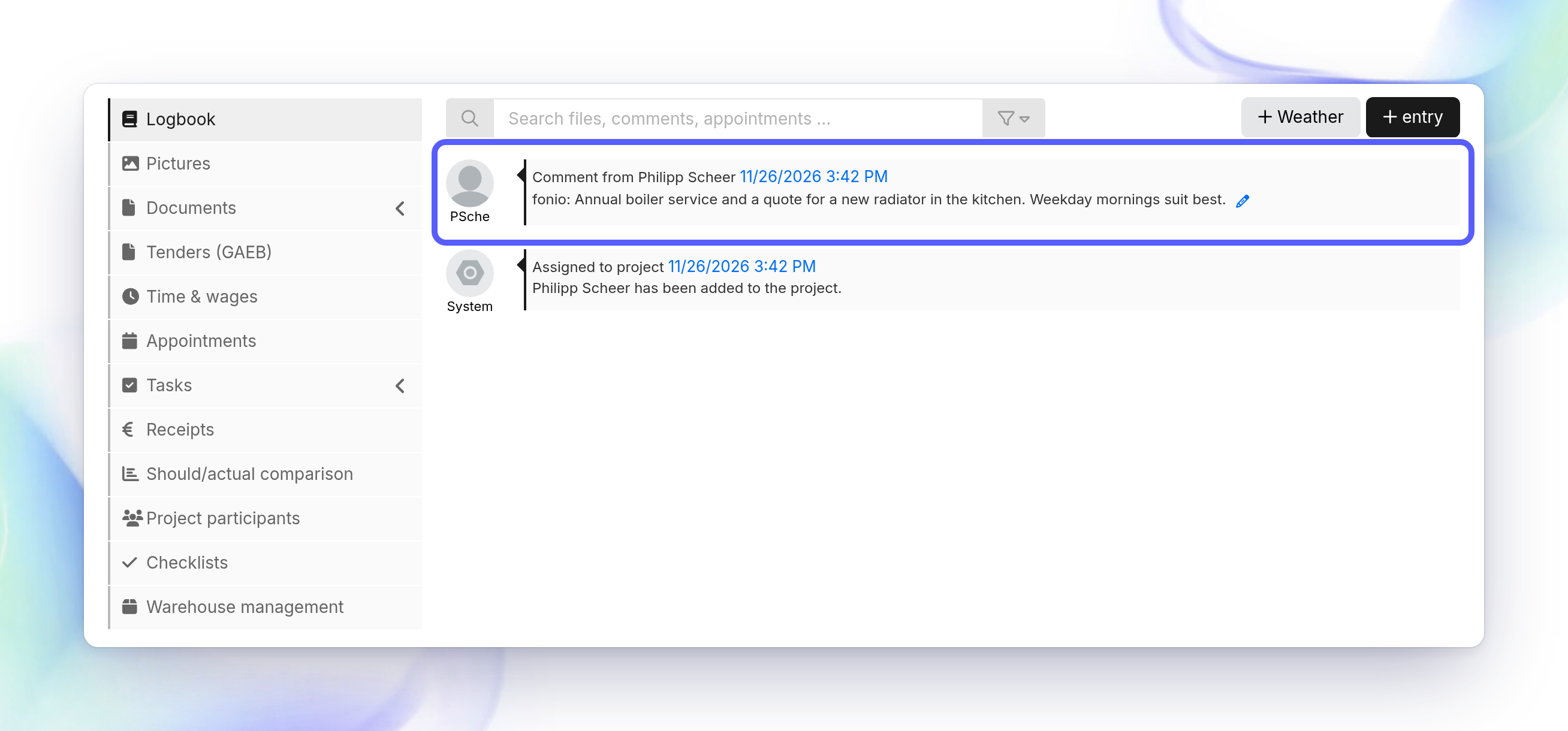
So when Emma calls back to say that weekday mornings suit her best, your assistant notes it on her project. Your team knows before they plan the visit.
When you allow it, your assistant also takes new inquiries. It asks for their first name, last name, e-mail address and address, and what they need. It spells the name and e-mail address back letter by letter until the caller confirms them. Then it creates a new customer with the caller's phone number and a new project in HERO, in the status for a first contact. The caller hears that their request was passed on, without a promise of when someone will call back.
Whenever your assistant can't do something, it tells the caller plainly.
After the call
With Log calls switched on, your assistant adds an entry to the project logbook: a summary of the conversation, how long it took and a link to the call in fonio.
The entry goes to the project the call was about: the one your assistant added a note to, created or looked up. If no project came up, but the caller has exactly one open project, it goes there. Otherwise, the call isn't logged.
In Conversations, under Post-Call Actions, you can see whether the entry was saved.
Good to know
- Recognition before the call: your assistant can only recognise a caller before the call when they're saved in your fonio Contacts with their last name, and the same number is on their customer in HERO. Everyone else is found during the call by their last name.
- Withheld numbers: without the caller's number, your assistant asks for the postal code of their address instead.
- Limits: your assistant sees up to 10 projects per call, open ones first, and the next 5 appointments of a project. If several customers share a last name and number, it finds up to 3 of them.
- Notes and summaries: they're added as new logbook entries starting with
fonio:, so nothing you wrote gets overwritten. - Time zone: appointment times follow German time.
If something isn't working
| Message | What to check |
|---|---|
| HERO does not accept this API key. | Did you copy the whole key from HERO support? Is it still active? Ask HERO support if you're unsure. |
| HERO cannot be reached right now. Try again later. | Does HERO open in your browser? If it only happens now and then, HERO was briefly unreachable. |
| The call could not be logged in HERO. (under Post-Call Actions in Conversations) | Is the key still active? If it only happens now and then, HERO was briefly unreachable. |
| Your assistant doesn't recognise a regular customer | Is the caller saved in your fonio Contacts with their last name? Is the number they call from saved on their customer in HERO, as a mobile or landline number? |
| Your assistant doesn't find a customer | Is the last name or company name spelled the same way as in HERO? Is the postal code saved on the customer's address in HERO? |
| Your assistant doesn't add notes or take inquiries | Is Add notes to projects or Create inquiries switched on? Notes only go on the caller's own projects. |
| A call isn't logged | Is Log calls switched on? Did the call involve a project, or does the caller have exactly one open project? |
Need help?
Just write us at support@fonio.ai, we're happy to help.